

First impression of the LEMFO LF16
Design and workmanship
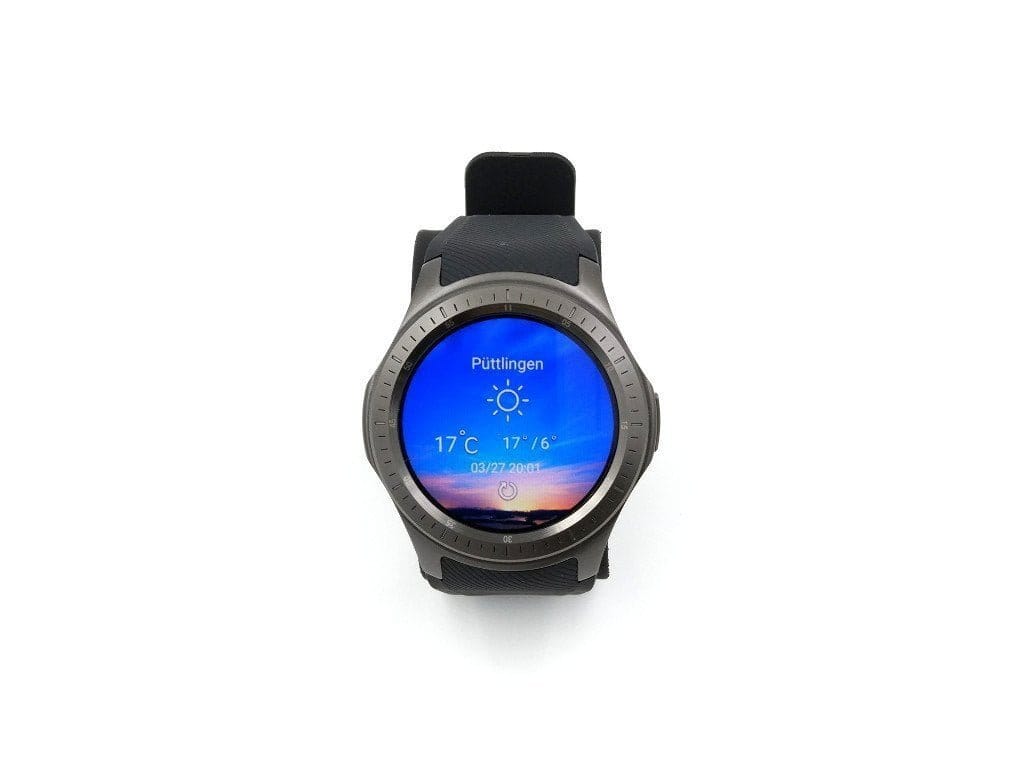
Wait a minute, is that a Samsung Gear S3? At least that's what you might think when you see the LEMFO LF16 for the first time. As with the Gear S3, there are 3 different colored silicone bracelets (red, white and black) to choose from and even the fluted pattern has been cheekily adopted. As if that weren't enough, LEMFO also copied the bezel of the Smasung Gear S3. In contrast to the much more expensive Samsung model, the bezel of the LEMFO LF16 is only optical and offers no functions. The upper part of the Smartwatch's housing is made of metal and is protected against dust and splash water in accordance with protection class IP54. It is better not to shower or swim with this smartwatch!
The processing is nothing to complain about. The bracelet with pin buckle closes well and the watch sits comfortably on the wrist overall. With a diameter of 50 mm and a height of 12 mm, the case does not look too bulky even on relatively narrow wrists.


Delivery
Everything you need is included in the scope of delivery. In addition to the smartwatch, the manufacturer has included a cleaning cloth, a charging cable with a 4-pin magnetic connector and a suitable screen protector. An additional screen protector was already on the watch glass, so that you are well taken care of when it comes to screen protection.


Display
The display of the LEMFO LF16 has a diagonal of 1.39 inches with 400 x 400 pixels. An AMOLED panel was used, which means that the colors shine even more strongly and the black appears even more saturated. A major advantage over a conventional LCD, in which the liquid crystals are illuminated by a backlight, is the energy efficiency. There is no background lighting on an AMOLED display. Each pixel lights up on its own and, especially when displaying a lot of black, the energy consumption can be significantly reduced.
In the test, the display impressed with its surprisingly sharp presentation. Individual pixels can only be seen when viewed very closely. As expected from an AMOLED panel, the display produces the black you want. In addition, all colors appear bright and bright. The viewing angle stability is also nothing to complain about. Regardless of the angle and direction from which you look at the display, legibility and color accuracy are retained. The maximum display brightness is also positive. The display remains legible even in direct sunlight. There are no blurry or sharp edges on this circular display. The accuracy of the touchscreen is good. Even the smallest entries, such as via the virtual keyboard, are accurately recognized.
Offering
A MediaTek MTK6580 processor works under the hood. Pretty much every China smartwatch over € 100 currently uses this processor, which has a total of 4 processor cores that clock at a maximum of 1.3 GHz. The memory equipment is comparatively small with only 512MB of RAM and an 8GB internal memory. The internal memory is effectively 6GB. The system already takes up 2GB of memory. There is no provision for memory expansion. Models from other manufacturers (e.g. Finow X5 Plus) already offer twice as much 1GB memory.
In everyday life, the LEMFO LF16 can be used fluently. Scrolling through the app list is fast. Occasionally make app load times noticeable, but these are still within reasonable limits and are not disturbing.
user interface

A native Android 5.1 runs on the smartwatch, as is known from smartphones. Google Play Services, among others, are preinstalled. This means that the Google PlayStore is already on the watch, through which all apps available for Android 5.1 can be installed. However, not every app is perfectly scaled due to the circular display. Depending on the app, it is possible that individual control surfaces are not displayed, which means that the app cannot be used with the LEMFO LF16. The most important apps, such as WhatsApp, Google Maps or Facebook, can be used very well despite the round display.
Overall, the user interface "smartwatchtauglich" adapted. App icons can be displayed in a list or in a round format. In the form of widgets, the user interface has, among other things, a notification display, a weather widget, a sports widget and a quick selection, which allows functions such as Bluetooth or WiFi to be activated / deactivated in one click.
The OTA update capability has to be criticized. Although an update was available at the time of the test, it could not be installed OTA (Over-The-Air). Different error messages before the update was downloaded were the result. Even after a manual update to the current version, the OTA error was not resolved.


Features
Watch Faces
A total of 19 watch faces are pre-installed. In addition, there is a download manager on the watch, which can be used to download 45 additional watch faces. Unfortunately, the designs of the LEMFO watch faces are not particularly appealing. Alternatively, manually created watch faces can also be installed on the watch.


Heart rate monitor and pedometer
For the sporty user, the Smartwach has a heart rate monitor and a pedometer. The heart rate is determined by means of a photodiode and a green LED. The data is recorded via the LEMFO LF16's "health app". In the test, it took a comparatively long time until the heart rate was recognized by the smartwatch. If you only wear your watch loosely on your wrist, you won't even get to take a measurement. More serious, on the other hand, are the inaccurate measurements, which during the test were 200 beats / minute or dropped to 30 beats / minute.
The pedometer, on the other hand, delivers more accurate results and deviates only slightly from the values of the previously tested one Lenovo HW01 from. In addition to the daily steps, the calories burned and the distance traveled are also displayed. A weekly overview provides an overview of the weekly data collected. For short-term sporting events, a measurement can be started for only this specific period.
Weather
For those who would like to stay up-to-date when it comes to the weather, the LEMFO LF16 offers a weather widget. The location is determined for this via GPS, but can also be entered manually. The clock receives the weather data from AccuWeather.

Google Play Services
In addition to the Google PlayStore already mentioned, other Play Services are also preinstalled on the Smartwatch. The Google Now Launcher starts under the “Voice Search” item and provides individually adapted information. Google Maps is also preinstalled and can be used for navigation thanks to the additionally integrated GPS module.


Other
Other functions include an alarm function, a calendar app, a web browser for surfing the Web, a gallery for viewing images, a sound recording program, a file manager, apps for remote control of the connected smartphone, telephony apps with contact function and an app for music playback.


Telephony, WLAN and Bluetooth
Seen in this way, the LEMFO LF16 is a watch-sized smartphone. The smartwatch can be used in the 3G cellular network via the integrated nano-SIM slot. Telephoning is therefore possible without any problems. A microphone and a loudspeaker are of course available. The voice quality and the range of the microphone are convincing. Even worn loosely on the wrist, the microphone was able to capture enough to make understandable calls to the other person. The playback quality of the speaker is decent and delivers a good volume.
The smartwatch can also find its way around well in WLAN. The 2.4G WiFi module delivers a good transfer rate and a stable connection quality. With a firmware update to the latest version from March 2017, hidden SSIDs can also be entered.
The same applies to transmission via Bluetooth. However, the "WiiWear" app, which establishes a connection between smartwatch and smartphone via Bluetooth and is used to transfer notifications, is less pleasant. On the one hand, the app under the name "WiiWear" is not in the official Google PlayStore, and the app also requires numerous authorizations. If you install the “WiiWear” app from the Chinese supplier, the app will be recognized as “Sinwear” in the Google PlayStore. The transfer of notifications via “WiiWear”, however, works well. For example, WhatsApp notifications received on the smartphone are promptly transmitted to the smartwatch. The user can determine which notifications are to be transmitted.

GPS
An interesting feature is the integrated GPS module. The LEMFO LF16 finds a GPS fix surprisingly quickly after just a few seconds. The preinstalled Google Maps display and usability are also surprisingly good. Accurate pedestrian navigation is therefore no problem.
Battery
LEMFO specifies the capacity of the battery as 360mAh. The charging time was around 2 hours in the test. With active WiFi, 3G and GPS, the possible usage time was one day. If gesture recognition was also activated, the LEMFO LF16 had to be charged in the early evening. The smartwatch is charged via a 4-pin magnetic connector.

Wolfgang Fröhlecke
Wolfgang Fröhlecke
With my Lemfo Lem 7 I can not adjust the volume of the ringtone, there is no sound at all, although I have selected a ringtone.
Michael
Is it possible to use the Whatsapp function without a connected mobile phone with an inserted SIM card?
Markus
Hello Timo…
I have a problem with my Rock LF 16 Smartwatsch ... it can no longer be switched on ... even if it is connected to the charger ... is it possible that the battery is broken? Greetings MARKUS
Timo
Hi Mark, if the smartwatch really does not make a sound anymore, whrsl. the battery over. Will the clock be recognized on the PC?
Markus
No unfortunately it is no longer recognized by the pc….?
I only got the watch 3 days ago ... !!
Is this a factory error dss the battery is already broken !?
Timo
It is probably a defect. I don't know the "Rock LF16" model in particular. But it is probably just a renamed LEMFO LF16. You could try unscrewing the watch, disconnecting the battery and then reconnecting it. The best thing to do is contact the dealer or the manufacturer.
Markus
Ok thanks Timo ... for the answers !! ??
It's worth trying the manufacturer….
Mike
Hello everybody. Had two whatsapp questions:
1. If you get the message on the clock, you can also read and answer it?
2.And if a picture is sent man sees it too?
Greetings Mike
CH4_Fox
Hi
Had a question for you:
What about the battery life? Does a normal day or not?
Timo
Hi CH4_Fox, the battery lasts one day during normal use.
Torsten
May I ask how the update can be done ??? So how I can install a new firmware. Unfortunately I also have various errors ...
Timo
Hi Torsten,
I guess you also have problems to install the OTA update directly over the clock. Alternatively there is the possibility to download a current firmware via this community: roundandroidwatches.proboards.com
Flashes the firmware as with any conventional MediaTek smartphone. You need the SP Flash tool, its driver and the appropriate scatter file. Everything is explained in detail in the forum mentioned above. The software including drivers can be found on the net. I hope I could at least help you a bit. For further questions, just ask.
Torsten
Many thanks for the help. Update worked out after the usual starting difficulties. Even once the firmware of the I4 installed. Nevertheless, I find no working app that sends me eg Whatsapp messages to my phone so that I can read from there and also answer. Android Wear certainly does not run for the dominoes or? Maybe they have a tip for me as I can realize that
MfG Torsten
Torsten
Of course I meant “that sends me Whatsapp messages from my phone to my smartwatch”
Timo
The “BT Notification” app or the “Mediatek SmartDevice” app are able to transfer notifications from the smartphone to the smartwatch. There is usually a QR code in the watch’s user interface that links to the appropriate app.
Marvin. j
I would like to know if you can make calls via Bluetooth?
Thank you so much.
Marvin
Timo
Hi, yes you can pair the watch via Bluetooth and make calls on the smartphone via the smartwatch.
Erik M.
Hey, thanks for the review. I've been thinking for some time if I should get the LF16 or the DM368. Is there no difference at all? And another question. How did you install the ROM if OTA does not work? greetings
Timo
Hello Erik, between the two watches there is no difference. Most of the time, these popular models are OEM goods, with each retailer simply printing their logo on the packaging. I would just pick the one that is currently cheaper in your place.
I installed the ROM via the SP Flash Tool for MediaTek devices. You can download the ROM from the LEMFO website or from XDA.